




- Reaction score
- 7
Permanent suspensions and bans are becoming increasingly common due to violations of community policies, the use of bots, duplicate content, mass complaints, or the detection of suspicious activity. The good news: Many accounts can be recovered if you act quickly and correctly. The bad news: It’s not always possible.
Important: This guide focuses on legitimate and official methods. Avoid third-party tools or hacks that could make the situation worse or lead to permanent bans on multiple accounts.
Before trying to recover your account, identify the reason (Instagram and TikTok send notifications):
Common issues on Instagram:
Common issues on TikTok:
Check the notification email or the message in the app.
Advanced Tips:
Success rate: Medium to high for bans due to errors or first warnings. Low for bans due to severe spam.
Other options:
TikTok is cracking down on automation and risky viral content.
Legal Notice: Recovering accounts using methods that violate the terms of service may result in permanent bans or more serious consequences. Always prioritize compliance.
#Instagram #TikTok #AccountRecovery #Flipping #SocialMedia
Important: This guide focuses on legitimate and official methods. Avoid third-party tools or hacks that could make the situation worse or lead to permanent bans on multiple accounts.
1. Understand why you were banned
Before trying to recover your account, identify the reason (Instagram and TikTok send notifications):
Common issues on Instagram:
- Copyright infringement or music.
- Excessive use of bots, mass following/unfollowing.
- Contenido spam, nudity, hate speech o scams.
- Accounts linked to other banned accounts.
- Mass complaints (reports).
Common issues on TikTok:
- Repetitive or duplicate content.
- Uso de scripts/automation.
- Participation in banned trends or risky challenges.
- Copyright infringements (audio or video).
- Suspicious activity (frequent IP changes, many devices).
Check the notification email or the message in the app.
2. Immediate Steps (Do this within the first 24–48 hours)
- Don't try to log in from multiple devices or IP addresses → This makes detection more difficult.
- Wait 24–72 hours before appealing (sometimes it's just a temporary ban).
- Check the app or website in incognito mode or on another clean device.
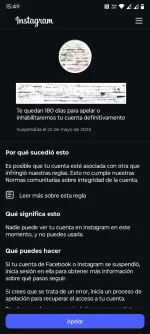
3. How to File an Appeal on Instagram
- Open the Instagram app → Go to the suspension message.
- Tap "Request a Review" or "Dispute the Decision."
- Fill out the form with:
- A clear and polite explanation (without aggression).
- Proof of ownership (ID, selfie with code, registration email, etc.).
- He argues that it was a mistake or a misunderstanding.
- Submit the appeal.
Advanced Tips:
- If the option doesn't appear, go to Settings → Help → Report a Problem.
- Submit only one appeal per issue. Multiple appeals submitted in quick succession may result in the review being closed.
- Use the Facebook Help Center (since Meta owns it) if it's linked.
- In serious cases, contact support at business.instagram.com if you had a verified business account.
Success rate: Medium to high for bans due to errors or first warnings. Low for bans due to severe spam.
4. How to File an Appeal on TikTok
- Open TikTok → Go to the ban message.
- Tap "Appeal" directly in the notification.
- Select the reason and explain briefly.
- Provide evidence (screenshots, proof of ownership).
- Send.
Other options:
- Go to Profile → Settings and Privacy → Support → Report a Problem.
- Use TikTok's official web form (search for "TikTok appeal ban" on Google).
- If you have a Pro/Creator account, mention that it affects your earnings.
TikTok is cracking down on automation and risky viral content.
5. Additional strategies if the initial appeal is unsuccessful
- Create a support ticket (be polite and persistent—no spam).
- Contact us from another account (a friend's or family member's) to ask for help with your main account.
- Wait 7–30 days and file another appeal with new information.
- Identity verification: Get ready to submit an official document and a selfie.
- Change your strategy: If you recover, clean up your account (remove risky content, drastically reduce activity during the first few days).
6. Prevention: How to Avoid Future Bans
- Use only official or approved tools.
- Limit follows and unfollows to a maximum of 50–100 per day.
- Vary the content and don't spam.
- Use high-quality proxies or VPNs only if necessary (it's best to avoid them).
- Monitor analytics and reports.
- Have a backup (email, verified phone number, 2FA).
- Diversify: Don't rely on just one account. Build a presence on multiple platforms.
7. Alternatives When Recovery Is Not Possible
- Create a new account strategically (different IP address, device, email address, and content style).
- Buy an aged/verified account on trusted marketplaces (such as forofox.com).
- Gradually shift your audience (mention the new account on other platforms).
Legal Notice: Recovering accounts using methods that violate the terms of service may result in permanent bans or more serious consequences. Always prioritize compliance.
"Have you managed to get a banned account reinstated? Share your experience below (no illegal methods)."
#Instagram #TikTok #AccountRecovery #Flipping #SocialMedia